
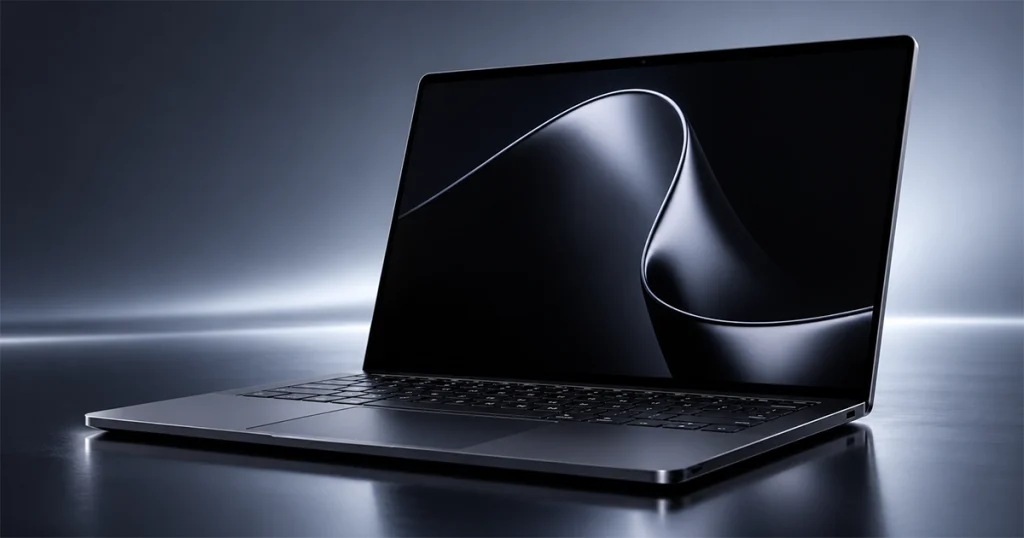
The Microsoft Surface Laptop Ultra is now official, and it is easily the most ambitious Surface laptop Microsoft has built.
Announced at Microsoft’s October 7, 2026 hardware event, the new laptop starts at $2,599.99, is available for preorder now, and begins shipping on October 16. It is the first Surface Laptop built around Nvidia’s new RTX Spark N1X platform, pairing an Arm-based Nvidia Grace CPU with Blackwell RTX graphics and unified memory configurations reaching 128GB.
The Surface Laptop Ultra is not aimed at ordinary office users. Microsoft is positioning it toward AI developers, creators, 3D artists, engineers and other professionals who want workstation-class local AI and graphics capabilities without moving to a desktop. Microsoft itself describes it as its most powerful Surface Laptop, designed around local AI and 3D graphics.
The big question is whether RTX Spark, a bright 120Hz display, large unified-memory configurations and a workstation-style port selection are enough to justify a starting price that is already above Apple’s base M5 Pro MacBook Pro.
Here is everything worth knowing before deciding whether Microsoft’s new flagship Surface deserves that money.
Surface Laptop Ultra Specs at a Glance
| Specification | Microsoft Surface Laptop Ultra |
|---|---|
| Starting price | $2,599.99 |
| Release date | October 16, 2026 |
| Processor | Nvidia RTX Spark N1X |
| CPU | 18-core or 20-core Nvidia Grace CPU |
| GPU | 5,120-core or 6,144-core Blackwell RTX GPU |
| Memory | 24GB, 32GB, 48GB, 64GB or 128GB LPDDR5x unified memory |
| Storage | 512GB Gen 4; 1TB or 2TB Gen 5 removable SSD |
| Display | 15-inch PixelSense Ultra touchscreen |
| Resolution | 3270 × 2180 |
| Aspect ratio | 3:2 |
| Refresh rate | Up to 120Hz |
| SDR brightness | Up to 1,000 nits |
| HDR peak | Up to 2,000 nits |
| Color | 100% DCI-P3 |
| Weight | 4.41 lb / 2.0 kg |
| Thickness | 17.99mm without feet |
| Webcam | 1080p Full HD |
| Wireless | Wi-Fi 7, Bluetooth 5.4 |
| Operating system | Windows 11 Home or Pro |
| Colors | Platinum, Nightfall |
| Battery claim | Up to 15 hours video / 12 hours web |
These core specifications come directly from Microsoft’s current product and business pages.
Surface Laptop Ultra Price and Release Date
Microsoft has opened preorders for the Surface Laptop Ultra, with first shipments scheduled for October 16, 2026.
The entry configuration costs $2,599.99 and includes:
- RTX Spark N1X
- 18-core Grace CPU
- 5,120-core Blackwell RTX GPU
- 24GB unified memory
- 512GB SSD
- Windows 11 Home
A 24GB/1TB version costs $2,999.99, while a 32GB/1TB Windows 11 Pro version is listed at $3,299.99.
At the high end, Microsoft currently lists:
| Configuration | Price |
|---|---|
| 18-core / 24GB / 512GB | $2,599.99 |
| 18-core / 24GB / 1TB | $2,999.99 |
| 18-core / 32GB / 1TB | $3,299.99 |
| 20-core / 64GB / 1TB | $4,299.99 |
| 20-core / 64GB / 2TB | $4,699.99 |
| 20-core / 128GB / 1TB | $5,899.99 |
The $5,899.99 flagship model combines the faster 20-core RTX Spark N1X with 128GB of unified memory and a 1TB SSD.
That means the Surface Laptop Ultra spans a huge range: from an expensive premium laptop at $2,599 to a nearly $6,000 specialist workstation.
What Is Nvidia RTX Spark?
RTX Spark is the reason the Surface Laptop Ultra is different from Microsoft’s previous Surface laptops.
Instead of using a conventional Intel, AMD or Qualcomm processor paired with a separate Nvidia laptop GPU, RTX Spark combines an Nvidia Grace Arm CPU, Blackwell RTX graphics, AI acceleration and unified memory into one platform.
Nvidia currently offers two laptop variants:
| RTX Spark N1X | Entry version | High-end version |
|---|---|---|
| Grace CPU | 18 cores | 20 cores |
| Blackwell GPU | 5,120 cores | 6,144 cores |
| Maximum memory | 64GB | 128GB |
| Laptop power range | 45–80W | 45–80W |
| Ray-tracing cores | 4th generation | 4th generation |
| Tensor cores | 5th generation | 5th generation |
| CUDA | Yes | Yes |
| DLSS | DLSS 5 | DLSS 5 |
Nvidia rates the platform at up to 1 petaflop of FP4 AI performance in its highest configuration. That is a manufacturer claim, not an independent Surface benchmark.
Nvidia’s official RTX Spark overview
Why unified memory matters
On a conventional PC with a dedicated GPU, system RAM and graphics VRAM are usually separate pools.
RTX Spark instead uses a shared unified-memory architecture.
That can be particularly useful for AI workloads because a large model does not have to fit entirely inside a relatively small dedicated VRAM pool.
Microsoft says the Surface Laptop Ultra can run local AI workflows involving models of up to 120 billion parameters, depending on the model and workload.
That is why the 128GB configuration matters much more for AI developers than it does for someone writing documents or browsing the web.
Design and Build Quality
The Surface Laptop Ultra looks surprisingly restrained for a machine this powerful.
Microsoft uses a premium aluminum chassis and sells it in Platinum and a darker Nightfall finish. The laptop weighs 4.41 pounds (2.0kg) and measures about 17.99mm thick without the feet.
That makes it portable enough to move between a desk, studio and office, but at two kilograms it is clearly closer to a professional workstation than an ultraportable.
Engadget’s initial hands-on impression described it as a very conventional-looking premium laptop despite the unusual hardware inside. The publication also found its physical build particularly strong during limited hands-on time, but that is an early impression rather than a full long-term review.
Microsoft has also built its largest Surface Laptop cooling system yet. The company claims the system provides up to 2.5× the thermal capacity of the Surface Laptop 15-inch 8th Edition, using larger fans that can move more air at lower speeds.
That sounds promising, but independent sustained-load testing is still needed to determine actual fan noise, temperatures and throttling.
Surface Laptop Ultra Display
The display is one of the strongest parts of the specification sheet.
The Surface Laptop Ultra uses a 15-inch PixelSense Ultra touchscreen with:
- 3270 × 2180 resolution
- 262 pixels per inch
- 3:2 aspect ratio
- Dynamic refresh rate up to 120Hz
- 100% DCI-P3 coverage
- Dolby Vision IQ
- 10-point multitouch
- 1,000-nit maximum typical SDR brightness
- 2,000-nit peak HDR luminance
- Anti-reflective treatment
Microsoft also says every display is individually color calibrated.
| Display feature | Surface Laptop Ultra |
|---|---|
| Size | 15 inches |
| Resolution | 3270 × 2180 |
| Aspect ratio | 3:2 |
| Refresh | Up to 120Hz |
| Touch | Yes |
| HDR | Dolby Vision IQ |
| Color gamut | 100% DCI-P3 |
| SDR brightness | Up to 1,000 nits |
| HDR peak | Up to 2,000 nits |
The unusually tall 3:2 aspect ratio should be particularly useful for coding, documents and creative timelines because it provides more vertical workspace than a typical 16:9 display.
Microsoft calls this its brightest Surface display yet. It even markets the 2,000-nit HDR figure as the highest peak HDR brightness of any laptop, though that particular superlative should be treated as Microsoft’s claim until broader independent comparisons are available.
CPU and GPU Performance: What We Know So Far
There are two primary RTX Spark configurations.
The less expensive version uses an 18-core Nvidia Grace CPU and 5,120-core Blackwell GPU.
More expensive models move to a 20-core CPU and 6,144-core GPU.
Those specifications make the machine interesting for:
- CUDA-accelerated applications
- 3D rendering
- Blender
- video editing
- local generative AI
- AI inference
- engineering workloads
- GPU compute
- some gaming
However, the Surface Laptop Ultra is only now reaching reviewers. There is not yet enough independent benchmark data to responsibly claim that it beats a particular MacBook Pro, RTX workstation or gaming laptop across real-world workloads.
That distinction matters.
Microsoft says it is the company’s most powerful Surface laptop; that is credible as a product-positioning statement. It is not the same thing as proving it is the fastest laptop in its price class.
Ars Technica similarly describes the product as Microsoft’s first Surface built around RTX Spark and emphasizes its focus on local AI rather than presenting final independent performance conclusions.
AI Performance May Be the Real Reason to Buy It
Surface Laptop Ultra makes the most sense when the GPU is doing more than displaying a desktop.
Nvidia says CUDA runs natively on RTX Spark and markets the platform specifically for local AI development, agents, generative AI and creator workloads.
Microsoft’s own pitch focuses on:
- running local AI models
- prototyping AI agents
- reviewing and generating code
- keeping sensitive workloads on-device
- reducing cloud dependence
- working with models as large as roughly 120B parameters in supported circumstances
Microsoft also introduced broader “Hybrid Intelligence” concepts at its October event, combining local and cloud processing rather than assuming every AI request must run remotely. Reuters reported that Microsoft’s event focused heavily on making high-end local AI practical on Windows PCs.
For people who simply use Microsoft 365, browser apps and streaming services, this level of hardware is excessive.
For someone building or testing large local models, the value proposition is very different.
Why 128GB of Unified Memory Matters
The maximum 128GB LPDDR5x unified memory configuration is one of the Surface Laptop Ultra’s most unusual specifications.
Microsoft currently offers:
- 24GB
- 32GB
- 48GB
- 64GB
- 128GB
The 24GB configuration runs Windows 11 Home, while higher-memory U.S. configurations use Windows 11 Pro.
A practical way to think about the options is:
24–32GB: general professional work, Adobe apps, coding and moderate creative workloads.
48–64GB: heavier video, 3D, development and medium local-AI workloads.
128GB: very large AI models, heavy datasets, complex professional projects and workloads where memory capacity is a genuine bottleneck.
Most users do not need 128GB.
It is a specialist option—and its $5,899.99 price reflects that.
Storage Is Removable and Upgradeable
Surface Laptop Ultra supports:
- 512GB Gen 4 removable SSD
- 1TB Gen 5 removable SSD
- 2TB Gen 5 removable SSD
Microsoft explicitly describes the storage as removable and highlights upgradeable storage as part of its long-term ownership strategy.
That is a meaningful advantage on a premium machine where storage needs may grow over several years.
Microsoft also says replacement components will be sold through Microsoft and iFixit for out-of-warranty repair, although the complete model-specific replacement-parts list should be checked once Microsoft’s Surface repair documentation is fully updated for this exact model.
Ports: One of the Best Parts of the Laptop
Microsoft has clearly tried to avoid the dongle-heavy workstation problem.
Surface Laptop Ultra includes:
| Port | Included |
|---|---|
| USB-C / USB4 | 2 |
| Magnetic USB-C / USB4 | 1 |
| HDMI | HDMI 2.1b |
| USB-A | USB-A 3.1 |
| SD reader | Full-size |
| Headphone jack | 3.5mm |
| Wi-Fi | Wi-Fi 7 |
| Bluetooth | Bluetooth 5.4 |
All three USB-C ports support up to 40Gbps data transfer, charging and DisplayPort 2.1. Microsoft says the laptop can drive up to three 4K displays at 60Hz.
The most unusual feature is Magnetic Connect.
Instead of bringing back Microsoft’s proprietary Surface Connect connector, Microsoft built magnetic breakaway functionality into a normal USB-C port.
That means the cable can detach if someone trips over it while the port can still behave like standard USB-C.
Microsoft calls it the world’s first built-in magnetic USB-C charging port. Tom’s Guide highlighted the idea as one of the more interesting innovations in the machine.
Keyboard and Haptic Trackpad
Microsoft includes a full function-key row and an automatically illuminated keyboard.
The Surface Laptop Ultra also uses Microsoft’s largest precision haptic touchpad yet.
The haptic design means the click sensation is produced electronically rather than relying entirely on a conventional hinged mechanism.
That can provide more consistent feedback across the whole pad.
Still, keyboard comfort and trackpad quality are things that should ultimately be judged through extended hands-on use. Microsoft’s specifications alone cannot establish whether either is better than the MacBook Pro’s keyboard and Force Touch trackpad.
Webcam, Microphones and Speakers
The laptop includes:
- 1080p Full HD front camera
- Windows Hello facial authentication
- Enhanced Sign-in Security
- Dual Studio microphones
- Quad Omnisonic speakers
- Dolby Atmos support
- Bluetooth LE Audio
Microsoft’s business specification page confirms the hardware.
A 1080p webcam is respectable, although Apple’s current MacBook Pro uses a higher-resolution 12MP Center Stage camera.
For video calls, actual image processing, microphone quality and speaker performance still need independent testing.
Surface Laptop Ultra Battery Life
Microsoft claims:
- Up to 15 hours of local video playback
- Up to 12 hours of active web use
Its internal tests were conducted on a preproduction system with the higher-end 6,144-core RTX Spark N1X, 64GB of memory and a 1TB SSD.
These are controlled manufacturer tests.
They should not be interpreted as guaranteed real-world runtime.
AI inference, 3D rendering, gaming or continuous GPU compute could produce dramatically different results.
Microsoft claim vs real testing
Microsoft-rated: up to 15 hours video / 12 hours browsing.
Independent real-world battery life: still needs proper review testing.
This will be one of the most important sections to update after full reviews arrive.
Cooling and Fan Noise
Powerful hardware means cooling matters.
Microsoft says the Surface Laptop Ultra contains its largest thermal system yet, with larger fans providing up to 2.5× the thermal capacity of the Surface Laptop 15-inch 8th Edition.
What we still need to know is:
- sustained CPU performance
- sustained GPU performance
- temperatures under rendering
- fan volume
- keyboard temperature
- performance while on battery
- throttling during long AI workloads
Until independent reviewers run those tests, any conclusion about whether the cooling system is “quiet” or “excellent” would be premature.
Can Surface Laptop Ultra Game?
Yes—but gaming is not necessarily its best reason to exist.
RTX Spark supports Nvidia technologies including:
- hardware ray tracing
- DLSS 5
- Reflex 2
- G-SYNC
- DirectX 12 Ultimate
- Game Ready Drivers
Nvidia officially includes gaming as one of RTX Spark’s target use cases.
Microsoft also advertises ray-traced gaming, DLSS and Reflex on the laptop’s 120Hz display.
However, there is an important compatibility consideration.
RTX Spark uses an Arm-based Grace CPU, meaning software written only for traditional x86-64 Windows may rely on Microsoft’s Prism translation layer unless a native Arm64 version exists.
Microsoft says Windows on Arm can run most x86 and x64 software through emulation, while native Arm software offers the best performance.
Windows Central notes that this makes Surface Laptop Ultra an unusual gaming machine: RTX features are strong, but Arm compatibility can still matter for individual games and anti-cheat systems.
Dedicated gamers should therefore check the exact games they play before spending $2,599 primarily for gaming.
Creator Performance Could Be More Important Than Gaming
RTX Spark potentially makes more sense for professional creative applications.
Nvidia markets the platform through Nvidia Studio, with acceleration for 3D, video and AI-assisted creation.
The hardware combination should be particularly relevant for applications such as:
- Blender
- Adobe Premiere Pro
- After Effects
- Photoshop
- DaVinci Resolve
- Unreal Engine
- 3D rendering
- AI image/video workflows
Some major creative applications, including Blender and DaVinci Resolve, already have native Windows on Arm versions according to Microsoft.
The real question is not whether the applications launch.
It is whether RTX Spark can deliver enough sustained performance to beat or match competing MacBook Pro and x86 workstation configurations at similar prices.
That requires benchmark testing we do not yet have.
Developer and Local-AI Workloads
This may be the Surface Laptop Ultra’s strongest use case.
Nvidia’s native CUDA support on RTX Spark matters because CUDA remains heavily used in machine learning, scientific computing, rendering and AI development.
Microsoft specifically targets:
- Visual Studio and development
- Python
- WSL
- AI agents
- local inference
- model testing
- large datasets
- CUDA workloads
- machine-learning workflows
Microsoft says the unified-memory configuration can allow supported local workloads using models up to around 120B parameters.
This is where a 64GB or 128GB configuration could make far more sense than it would for conventional productivity.
The laptop could let some developers prototype or run models locally that previously required a desktop GPU workstation or cloud instance.
That is the argument behind the product—not that everyone needs a $6,000 laptop.
Windows 11, Copilot+ and AI Features
Surface Laptop Ultra is officially a Copilot+ PC.
The 24GB consumer configuration ships with Windows 11 Home, while larger configurations use Windows 11 Pro in the U.S.
The platform also includes an Nvidia NPU.
That means Microsoft’s supported Windows AI experiences and Copilot features are part of the package, but the more distinctive capability is RTX Spark’s much larger GPU-based AI compute.
An NPU is useful for efficient always-on Windows AI tasks.
The Blackwell RTX GPU is what makes the system interesting for much heavier AI inference and creation.
Repairability and Upgradeability
Surface laptops have not always had the strongest reputation for repairability, but Microsoft has moved significantly in the opposite direction.
For Surface Laptop Ultra, Microsoft highlights:
- published repair documentation
- internal component labeling/wayfinding
- replacement parts
- removable SSD
- storage upgrades
- components supplied through Microsoft and iFixit
Microsoft warns that self-repair can create electrical, fire, damage and injury risks and that damage caused during unauthorized repair may not be covered by warranty.
The SSD is definitely removable.
The memory, however, is unified LPDDR5x memory integrated into the platform and should be chosen correctly at purchase because Microsoft does not describe it as user-upgradeable.
For a machine this expensive, that makes the memory decision particularly important.
Surface Laptop Ultra vs MacBook Pro
The closest mainstream competitor is Apple’s MacBook Pro.
A useful comparison is the current 14-inch M5 Pro MacBook Pro, which Apple launched earlier in 2026.
| Feature | Surface Laptop Ultra | MacBook Pro 14 M5 Pro |
|---|---|---|
| Starting price | $2,599.99 | $2,199 |
| CPU | 18-core or 20-core Grace | Up to 18-core M5 Pro |
| GPU | 5,120 / 6,144-core Blackwell RTX | Up to 20-core M5 Pro GPU |
| Maximum unified memory | 128GB | Up to 128GB depending chip |
| Starting storage | 512GB | 1TB |
| Display | 15-inch 3270×2180 | 14.2-inch Liquid Retina XDR |
| Refresh | Up to 120Hz | Up to 120Hz |
| Touchscreen | Yes | No |
| Maximum HDR peak | 2,000 nits claimed | 1,600 nits HDR peak |
| SD card | Yes | Yes |
| HDMI | Yes | Yes |
| USB-A | Yes | No |
| OS | Windows 11 | macOS |
| CUDA | Yes | No |
| Weight | 4.41 lb | Lower, depending model |
| Battery claim | 15h video | Up to 24h on some MacBook Pro configs |
Apple’s current 14-inch M5 Pro MacBook Pro starts at $2,199, while the M5 Max versions cost considerably more.
Where Surface may have the advantage
Surface Laptop Ultra offers:
- touchscreen
- CUDA
- Nvidia RTX ecosystem
- USB-A
- magnetic USB-C
- local AI workflows built around Nvidia
- Windows software ecosystem
Where MacBook Pro may have the advantage
MacBook Pro offers:
- lower M5 Pro entry price
- 1TB starting storage
- much stronger official battery-life claim
- mature Arm-native macOS ecosystem
- established creator performance
- Thunderbolt 5
- higher-resolution webcam
The important point is that there is no universal winner.
AI developers heavily invested in CUDA may find the Surface much more attractive.
Someone working in Final Cut Pro, Logic Pro or the Apple ecosystem may still prefer MacBook Pro.
A proper performance comparison should wait for independent Surface Laptop Ultra benchmarks.
Surface Laptop Ultra vs Other Windows RTX Spark Laptops
Microsoft is not the only manufacturer using RTX Spark.
Nvidia currently lists RTX Spark systems from manufacturers including:
- Asus
- Dell
- HP
- Lenovo
- MSI
- Microsoft
Examples include Asus ProArt P14/P16, Dell XPS 16, HP OmniBook models and Lenovo systems.
This is important because the Surface Laptop Ultra’s $2,599 starting price cannot be evaluated in isolation.
The Verge reports that the first RTX Spark notebooks span prices reaching roughly $7,000, depending on vendor and configuration.
So Microsoft is expensive—but not uniquely expensive within the new RTX Spark category.
The best Surface advantage may be its combination of:
- Microsoft’s own Windows hardware/software integration
- strong display
- wide port selection
- magnetic USB-C
- premium design
The downside is that competing manufacturers may offer larger displays, OLED panels, different thermals or more storage at similar prices.
Surface Laptop Ultra Pros and Cons
Potential Pros
- Powerful Nvidia RTX Spark platform
- Up to 128GB unified memory
- Native CUDA support
- Excellent-looking 15-inch 120Hz display specifications
- 2,000-nit HDR peak claim
- Touchscreen
- Strong port selection
- Full-size SD card reader
- USB-A remains available
- Innovative magnetic USB-C connector
- Removable SSD
- Wi-Fi 7
- Premium aluminum chassis
- Strong local-AI positioning
- Good fit for developers and creators
Potential Cons
- Very high $2,599 starting price
- Flagship configuration reaches $5,899.99
- Base model has only 512GB storage
- Memory is not a conventional user-upgradeable DIMM
- Arm architecture can still create application/game compatibility questions
- Microsoft’s battery claim trails MacBook Pro’s on paper
- No independent long-term battery results yet
- No comprehensive independent thermal testing yet
- Full RTX Spark performance benchmarks are still limited
- Overkill for normal productivity users
Who Should Buy Surface Laptop Ultra?
The Surface Laptop Ultra makes the most sense for a relatively narrow but important group.
Consider it if you are:
- AI developer
- machine-learning engineer
- CUDA developer
- 3D artist
- Blender user
- video editor
- game developer
- software engineer
- local-AI enthusiast
- researcher working with large models
- professional who genuinely needs 64GB–128GB memory
The strongest reason to choose it is not simply “it is fast.”
It is that RTX Spark brings Nvidia CUDA, Blackwell graphics and very large unified memory into a premium portable Windows machine.
Who Should Probably Skip It?
The Surface Laptop Ultra is difficult to justify for:
- regular office workers
- students writing documents
- casual web users
- Netflix/YouTube users
- light Photoshop users
- buyers with a $1,000–$1,500 budget
- people buying primarily for maximum battery life
- gamers who only care about frame rates per dollar
A conventional Surface Laptop, MacBook Air, MacBook Pro, gaming laptop or creator notebook will often make more financial sense for those users.
Is Surface Laptop Ultra Worth $2,599?
For ordinary laptop buyers: probably not.
The base price alone places Surface Laptop Ultra into specialist professional territory.
But for users who can exploit RTX Spark, CUDA, unified memory and local AI, the calculation is different.
A developer who otherwise needs a desktop GPU workstation, cloud GPU instance or separate AI development system may see real value in having those capabilities inside one portable machine.
The biggest weakness of the base model is arguably not the processor—it is the 24GB memory and 512GB SSD at $2,599.99.
Apple’s M5 Pro MacBook Pro starts lower and includes 1TB of storage, although it lacks CUDA and the RTX ecosystem.
At the other end, the $5,899.99 Surface with 128GB memory is clearly not intended for a conventional consumer.
The sensible conclusion today is:
Surface Laptop Ultra looks unusually capable on paper, but its final value cannot be judged properly until independent reviewers test sustained performance, AI workloads, battery life, compatibility, thermals and fan noise.
That is much more defensible than declaring it the new “best laptop” before full reviews exist.
Final Verdict
The Microsoft Surface Laptop Ultra is not simply a faster Surface Laptop.
RTX Spark turns it into something closer to a portable AI and creator workstation, with native CUDA, Blackwell graphics, up to 128GB of unified memory, a bright 120Hz touchscreen, strong connectivity and removable storage.
The $2,599.99 starting price is the main obstacle. At almost $6,000 for the flagship configuration, this is clearly targeted at professionals whose workloads can actually use what RTX Spark provides.
For AI developers, 3D artists, engineers and high-end creators, it is one of the most interesting Windows laptops of 2026.
For everyone else, there are much cheaper laptops that make more sense.
And because full independent reviews are only starting to arrive, anyone considering the Surface Laptop Ultra primarily for performance should wait for rigorous benchmark, battery and thermal testing before making the final buying decision.


Add your first comment to this post