
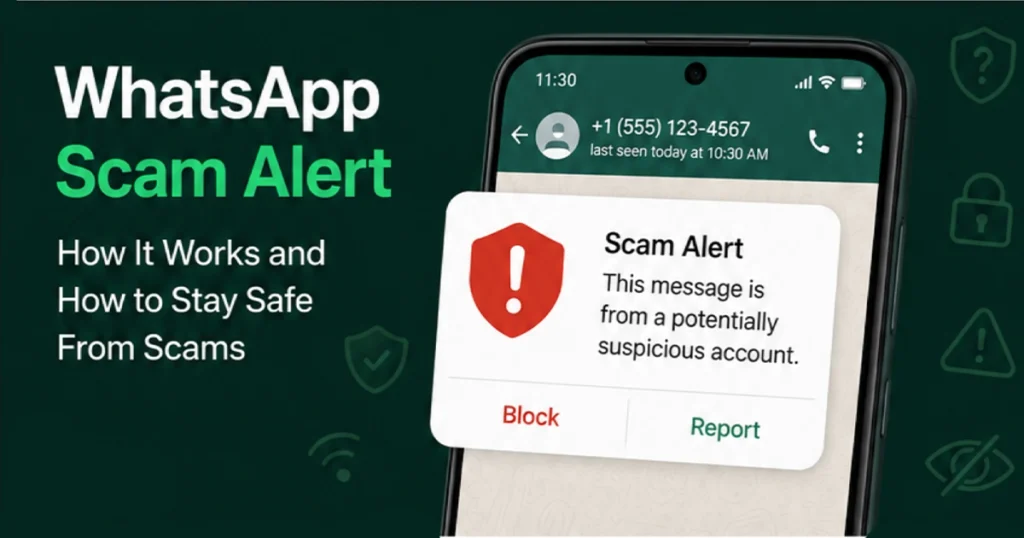
The WhatsApp Scam Alert Feature is entering limited beta testing on Android, giving selected users a new way to identify potentially suspicious messages before they fall for a scam. Meta says the optional feature uses an on-device machine-learning model to identify patterns associated with potential scam messages while keeping message content on the device.
The feature is particularly interesting because WhatsApp says the detection system is designed to work without automatically sending message content to WhatsApp, Meta, or a third party for classification. If the system believes a conversation may involve a scam, it can display a warning inside the chat and give the user control over what happens next.
However, there is an important distinction: WhatsApp Scam Alert is not yet available to everyone. Reports indicate that the feature is currently reaching a limited group of Android beta testers, including users on WhatsApp beta for Android version 2.26.34.1.
WhatsApp Scam Alert Feature: Key Features at a Glance
- On-device scam detection: A machine-learning model runs on the user’s device.
- Potential scam warnings: WhatsApp can warn users when a message appears to match known scam patterns.
- Privacy-focused design: Message content is not automatically sent to WhatsApp or Meta for classification.
- User-controlled: Scam Alert is optional and can be turned on or off.
- Block or report: Users can take action when a warning appears.
- Trust a conversation: Users can mark a wrongly flagged chat as trusted.
- Limited beta rollout: The feature is currently being tested with selected Android beta users rather than released globally.
What Is the WhatsApp Scam Alert Feature?
The WhatsApp Scam Alert Feature is a new security tool designed to help users recognize potentially fraudulent conversations.
Scammers frequently rely on social engineering rather than sophisticated hacking. They may contact someone from an unknown number, pretend to represent a company, offer an investment opportunity, promise an easy job, claim that an account needs urgent verification, or impersonate a friend or family member.
WhatsApp’s Scam Alert is intended to provide another warning layer before a user responds or takes an action that could put their money, account, or personal information at risk.
Meta’s technical explanation says the feature is designed to analyze incoming messages from non-contacts using a machine-learning model that runs locally on the device. The model looks at conversational structure and linguistic signals associated with scam conversations.
This means Scam Alert is not intended to replace common-sense security practices. Instead, it gives users an additional warning when WhatsApp’s system detects a potentially suspicious pattern.
WhatsApp Scam Alert Feature: How Does It Work?
The WhatsApp Scam Alert Feature uses an on-device machine-learning model.
When a user enables Scam Alert, WhatsApp downloads the relevant model to the device. The model then analyzes incoming messages from people who are not already saved as contacts and checks whether their patterns resemble known scam conversations.
The process can be simplified into four stages:
1. A message arrives from an unknown contact
The system is designed to focus on messages from people who are not already in the user’s contacts.
This is important because unexpected messages from unknown numbers are a common starting point for many scams.
2. The device analyzes the conversation pattern
Instead of sending the message content to Meta for automatic classification, the machine-learning model operates on the device.
Meta says the model uses conversational structure and linguistic signals to make a probabilistic assessment of whether a message resembles known scam patterns.
3. WhatsApp can display a warning
If the model determines that a message is likely to be a scam, the user can receive a warning within the conversation.
The warning is visible to the recipient and is not shown to the other person in the chat.
4. The user decides what to do
A warning does not automatically end the conversation.
The user can choose to:
- Block the account.
- Report the account or conversation.
- Continue the conversation if they believe the warning is incorrect.
- Mark the chat as trusted when appropriate.
This user-controlled approach is an important part of the feature’s design.
Does WhatsApp Scam Alert Read Your Private Messages?
Privacy is one of the most important aspects of the WhatsApp Scam Alert Feature.
According to Meta’s engineering documentation, the machine-learning model runs on the device. Message content does not leave the device for classification, and messages are not automatically reported to WhatsApp, Meta, or another third party.
That approach is designed to preserve WhatsApp’s end-to-end encrypted messaging architecture while still providing an additional layer of scam detection.
There is also a voluntary feedback mechanism. If a user marks a conversation as trusted, they can choose to share the last five messages with WhatsApp to help improve the feature’s accuracy. This sharing is optional rather than automatic.
Is WhatsApp Scam Alert Available to Everyone?
No.
The WhatsApp Scam Alert Feature is currently in limited beta testing, so users should not expect to see it on every WhatsApp account.
Recent reports indicate that the feature is reaching a limited number of Android beta testers, with WhatsApp beta for Android version 2.26.34.1 among the builds where the feature has been reported.
WABetaInfo has also reported the feature as a limited rollout for beta users and notes that availability is being expanded gradually.
WhatsApp has not announced a general public release date for the feature. Therefore, users should avoid assuming that installing the latest stable version will automatically give them access.
How to Stay Safe From WhatsApp Scams
Even with the WhatsApp Scam Alert Feature, users should continue following basic security practices.
1. Do Not Share Your WhatsApp Verification Code
Never give your WhatsApp registration code or password to another person.
WhatsApp specifically advises users not to share their six-digit registration code and recommends enabling two-step verification.
If someone asks you for a verification code, treat it as a major warning sign.
2. Be Careful With Unexpected Investment Offers
Messages promising guaranteed profits, unusually high returns, or quick money should be treated with extreme caution.
Scammers often create urgency and try to convince victims to send money before they have time to verify the offer.
Meta recommends a simple approach: pause, question and verify before responding to suspicious requests.
3. Verify Friends and Family Through Another Channel
An impersonation scam can look convincing.
If someone claiming to be a friend or relative suddenly asks for money or sensitive information, contact them using a phone number or another communication method you already know.
Do not rely only on the WhatsApp conversation to verify their identity.
4. Never Share Passwords or Sensitive Information
Avoid sending passwords, banking information, verification codes, identity documents, or other sensitive information to unknown contacts.
A legitimate organization generally should not require you to disclose account credentials through an unexpected WhatsApp message.
5. Be Careful With Links and QR Codes
Scammers can use links and QR codes to direct users to fraudulent websites or manipulate them into linking their WhatsApp account to another device.
Meta has previously warned about scams in which criminals attempt to convince users to enter their phone number and then provide a device-linking code, or scan a QR code under false pretenses.
If you did not initiate the action, stop and verify what you are being asked to do.
6. Check Linked Devices Regularly
WhatsApp recommends checking your linked devices and logging out devices you do not recognize.
This is particularly important if you suspect someone may have gained access to your account.
7. Use Two-Step Verification
Two-step verification adds another layer of protection to your WhatsApp account.
WhatsApp has also recently announced an upgrade to its account-security system, moving its traditional six-digit two-step verification PIN toward a stronger password-based approach.
What Should You Do If WhatsApp Shows a Scam Warning?
If the WhatsApp Scam Alert Feature warns you about a conversation, do not immediately assume the message is legitimate.
First, stop and examine the situation.
Ask yourself:
- Do I know this person?
- Did I expect this message?
- Are they asking for money?
- Are they requesting a verification code?
- Are they creating urgency?
- Are they asking me to click a suspicious link?
- Are they asking me to scan a QR code?
- Does the offer sound too good to be true?
- Can I verify the person’s identity independently?
If several warning signs are present, the safest option is generally to stop communicating and use WhatsApp’s block and report controls.
At the same time, users should remember that an automated warning is not proof that a person is a scammer. Machine-learning systems make probabilistic assessments, which is why WhatsApp gives users control over whether to trust, block, report, or continue a conversation.
WhatsApp Scam Alert Feature and End-to-End Encryption
One of the most notable technical aspects of the WhatsApp Scam Alert Feature is its relationship with end-to-end encryption.
WhatsApp says its private conversations remain protected by end-to-end encryption, while Scam Alert performs its classification locally on the device.
This architecture attempts to solve an important problem: how can WhatsApp provide additional scam protection without requiring the contents of private conversations to be sent to a central server for analysis?
Meta’s answer is an on-device machine-learning model.
The company says no message content leaves the device for classification. It also says that messages are not automatically reported to WhatsApp or Meta when the model detects a potential scam.
Why the WhatsApp Scam Alert Feature Matters
Scams have increasingly moved beyond obvious spam messages.
Modern scams can involve impersonation, fake employment offers, investment schemes, account takeovers, social engineering and fraudulent links. The scammer’s objective is often to manipulate the victim into making a decision quickly.
That makes warnings particularly useful at the moment when a user is deciding whether to respond.
The WhatsApp Scam Alert Feature could therefore become an important additional security layer because it attempts to identify suspicious patterns before a user engages further.
However, no automated detection system can identify every scam. Users should continue to verify unexpected requests and avoid sharing sensitive information.
WhatsApp Scam Alert Feature: What We Know So Far
| Feature | Current status |
|---|---|
| Scam detection | In limited beta testing |
| Platform | Android beta |
| Reported beta version | 2.26.34.1 |
| Detection method | On-device machine learning |
| Focus | Potential scam messages from non-contacts |
| Automatic message upload for detection | No, according to Meta |
| User control | Yes |
| Block/report options | Yes |
| Public release | Not announced |
The reported beta version and limited availability come from current beta reporting, while the technical design and privacy behavior are documented directly by Meta.
Final Thoughts
The WhatsApp Scam Alert Feature represents another step in WhatsApp’s effort to help users recognize scams before they become victims.
Its most notable aspect is the combination of on-device machine learning, user-controlled warnings and privacy protection. Instead of automatically sending message content to Meta for classification, WhatsApp says the detection model operates locally on the device.
For now, however, users should remember that Scam Alert is still a limited beta feature, with reports of availability among selected Android beta testers. It should not yet be described as a standard feature available to every WhatsApp user.
The best defense remains a combination of technology and good security habits: pause before responding to unexpected requests, verify identities independently, never share verification codes, avoid suspicious links and QR codes, check linked devices, and enable additional account protections.
In short, Scam Alert can provide another layer of protection—but the final security decision still belongs to the user.





Add your first comment to this post