
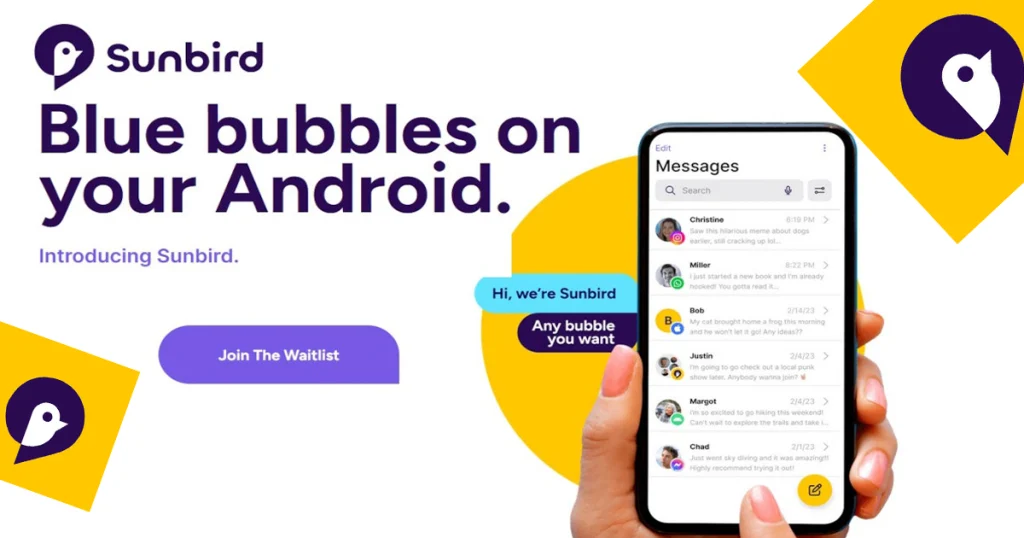
Android users have another way to get into iMessage conversations without owning a Mac or iPhone. Sunbird is back on Android in 2026, offering blue-bubble iMessage conversations alongside Google Messages, RCS and SMS in a single inbox.
But Sunbird is not a normal messaging app. It needs to connect Android users to Apple’s iMessage system through Sunbird’s own infrastructure, which makes one question particularly important: is Sunbird safe enough to trust with your messages and Apple account?
That question is even more important because Sunbird’s earlier service was shut down in 2023 after serious security problems were discovered. The current version makes very different security claims, but its history means a closer look is justified.
Sunbird Android Review: Quick Verdict
Sunbird is an interesting solution for Android users who specifically want the iMessage experience. The current app combines iMessage, Google Messages/RCS and SMS/MMS, supports blue-bubble conversations with iPhone users, and does not require users to own a Mac or another Apple device.
The trade-off is that Sunbird is a third-party service sitting between Android and Apple’s messaging ecosystem. It also costs money after a 14-day free trial, and some early users have reported connection and setup problems.
At a glance:
| Feature | Sunbird |
|---|---|
| Platform | Android |
| iMessage | Yes |
| Blue bubbles | Yes |
| RCS | Yes |
| SMS/MMS | Yes |
| Mac required | No |
| iPhone required | No |
| Free trial | 14 days |
| Monthly price | $2.99 |
| Annual price | $24.99 |
| Group chats | Yes |
| High-resolution media | Yes |
| Read receipts | Yes |
| Typing indicators | Yes |
| Main concern | Security history and reliability |
Pricing and feature information are based on Sunbird’s current website, Google Play listing and recent 2026 coverage.
What Is Sunbird for Android?
Sunbird is an Android messaging app designed to bring iMessage conversations to Android phones.
Its main attraction is simple: an Android user can communicate with iPhone users through iMessage and appear in those conversations with blue bubbles. Sunbird also puts Google Messages, RCS and SMS/MMS into the same application.
The current app also introduces Primary and Secondary inboxes, allowing users to keep important conversations separate from other messages. Sunbird says setup can be completed directly from an Android phone without a Mac, iPhone or home server.
That makes the 2026 version considerably different from older solutions that required users to maintain Apple hardware.
How Does Sunbird Bring iMessage to Android?
This is the part that makes Sunbird different from a normal messaging app.
Apple does not offer an official iMessage application for Android. Sunbird therefore provides its own system for connecting an Android user to Apple’s messaging network.
According to Sunbird, the current service creates a private iMessage connection for each user. The company says the Apple ID password is used once during setup and then destroyed, while the ongoing iMessage session is managed through Apple’s Messages software.
Sunbird says messages are encrypted on the Android device and while travelling through its infrastructure. It also says that the final connection to an iPhone is protected by Apple’s own iMessage encryption.
However, this is an important distinction: these are Sunbird’s current security claims, not the same thing as an independent security audit proving every part of the architecture.
That distinction matters because the company’s previous implementation had serious security problems.
What Can You Do With Sunbird?
The current Sunbird app is more than a basic iMessage bridge.
Its Google Play listing currently advertises:
- Blue-bubble iMessage conversations
- Google Messages and RCS
- SMS
- Read receipts
- Typing indicators
- Reactions
- High-resolution photos and videos
- Group chats
- Primary and Secondary inboxes
- Setup without an Apple device or computer
Sunbird is also planning additional messaging integrations. The company says WhatsApp, Messenger, Telegram, Signal and other services are on the roadmap, although those should not be treated as currently available features unless the company officially launches them.
Sunbird has also announced features under Sunbird Intelligence, including message summaries, smart replies and an AI agent. These are presented as upcoming features rather than the core reason to use the app today.
How to Set Up Sunbird on Android
The current setup is designed to be completed directly from an Android phone.
1. Download Sunbird
Install Sunbird: iMessage on Android from the Google Play Store.
2. Create a Sunbird account
Open the app and follow the account-creation and onboarding instructions.
3. Start the trial
New users currently receive a 14-day free trial before a subscription is required.
4. Connect iMessage
Follow Sunbird’s instructions to connect your Apple account to the iMessage service.
5. Connect Google Messages
Sunbird can also bring Google Messages/RCS and SMS into the same inbox.
6. Finish setup
Once the connections are established, your conversations can appear inside Sunbird’s unified inbox.
The exact screens can change as Sunbird updates the app, so users should follow the current onboarding instructions rather than relying on screenshots from older versions.
Is Sunbird Safe?
This is the hardest question in this Sunbird Android review.
The answer requires looking at both the current version and Sunbird’s security history.
What Sunbird says about security
Sunbird currently says that it does not store copies of users’ messages on its servers. It says messages are encrypted on the Android device and in transit, while media temporarily passing through its infrastructure is automatically deleted, generally within 48 hours and no later than 72 hours.
The company also says an Apple ID password is used once during setup and then destroyed, and that it does not retain an authentication token that could later be used to sign in as the user.
Those are significant changes from the concerns raised against the earlier version.
What does Google Play say?
Google Play’s current data-safety section says the developer reports no data collected, while also indicating that the app may share personal information with third parties. Google Play also says data is encrypted in transit and that users can request deletion of their data.
That information comes from the developer’s own disclosure, so readers should not interpret the Play Store label as an independent security certification.
What happened to Sunbird in 2023?
This is the part prospective users should not ignore.
In November 2023, Sunbird’s technology was used in Nothing Chats, an Android application designed to provide iMessage compatibility. Security researchers and technology publications found serious problems in the implementation, including exposed message and media data and weaknesses around Apple ID credentials. Nothing removed the application from Google Play, while Sunbird subsequently paused its own service.
Ars Technica reported that messages and other data had been stored in ways that contradicted the service’s security promises at the time. Texts.com researchers also published a technical investigation into the architecture.
The current Sunbird is a later version, and the company now describes a substantially different security model. But the 2023 incident is still relevant because it explains why privacy-conscious users may want more than marketing claims before trusting the service.
Sunbird Privacy: What Data Does It Handle?
There are several different pieces to consider.
First, Sunbird says your message history remains on your device and the recipient’s device rather than being stored as permanent conversation history on Sunbird’s servers.
Second, Sunbird says messages passing through its infrastructure are encrypted and that temporary media is deleted automatically.
Third, connecting iMessage requires an Apple account. Sunbird says the password is used once during setup and then destroyed.
The important point is that Sunbird still has to operate infrastructure that connects the Android application with Apple’s messaging ecosystem. That makes the company’s architecture and security practices an important part of the trust equation.
For users who are particularly privacy-conscious, the fact that Sunbird is proprietary software also matters. Sunbird says there are currently no plans to make its source code open source.
Does Sunbird Actually Work Reliably?
This is where the current user experience becomes more complicated.
Some users report that Sunbird works for their basic iMessage needs, while others have described problems connecting Apple accounts, connecting Google Messages or getting messages working correctly.
One detailed August 2026 user test documented repeated connection failures involving two Apple accounts, including a connection process that stalled at 99 percent. The tester eventually stopped after three weeks of troubleshooting. This is one user’s experience, not proof that the problem affects every Sunbird user, but it demonstrates that setup can still fail for some accounts.
Other Reddit users reported problems after disconnecting Sunbird, including difficulties receiving messages and needing additional Apple account changes to resolve them. Again, these are community reports rather than independently verified defects affecting all users.
There are also users reporting successful use, so the current experience appears mixed rather than universally broken.
For a review, that is important: Sunbird’s concept works, but the current service does not appear to provide the same predictability as using Apple’s own messaging system.
Sunbird Android Review: What I Like
iMessage without a Mac
This is probably Sunbird’s biggest selling point. The company says you don’t need a Mac, iPhone or personal server to use the current service.
One messaging inbox
Putting iMessage, RCS and SMS into one application is convenient for Android users who communicate across different platforms.
Blue bubbles
For people specifically looking for iMessage compatibility, Sunbird delivers the feature that started the entire project: conversations with iPhone users can appear as blue-bubble iMessage chats.
Modern messaging features
Read receipts, typing indicators, reactions, group chats and high-resolution media are all listed as current features.
Simple pricing
The current price is straightforward: $2.99 per month or $24.99 per year after the 14-day trial.
Sunbird Android Review: What I Don’t Like
The security history
The biggest concern is not a missing feature. It is trust.
Sunbird’s 2023 security incident was serious enough to shut down the earlier service, so users understandably have reason to examine the company’s current security claims carefully.
It costs money
Sunbird is not permanently free. After 14 days, users need a subscription to continue using it.
Setup may not work smoothly for everyone
Recent user reports include failed Apple account connections, Google Messages connection problems and issues after disconnecting the service.
RCS has reduced the original advantage
Apple’s adoption of RCS has made Android-to-iPhone communication better than it was before. High-quality media and other modern messaging features are now available through RCS, which means Sunbird’s biggest remaining difference is largely its ability to put Android users inside iMessage’s blue-bubble ecosystem.
Sunbird Pros and Cons
| Pros | Cons |
|---|---|
| iMessage on Android | Previous serious security controversy |
| No Mac required | Requires a third-party service |
| Blue-bubble conversations | Subscription required |
| RCS and SMS in the same app | Some users report connection problems |
| Group chats | Apple could change its platform or policies |
| Read receipts and typing indicators | Current security claims are primarily company-provided |
| High-resolution media | Not open source |
Sunbird vs RCS: Do Android Users Still Need iMessage?
This is where the situation has changed considerably.
When Sunbird first became interesting, Android-to-iPhone messaging had major limitations. Photos could be compressed, group conversations could behave differently, and Android users were often pushed into the familiar green-bubble experience.
RCS has changed much of that.
Apple now supports RCS, giving Android-to-iPhone conversations better media quality and other modern messaging features than traditional SMS.
Sunbird’s main remaining advantage is therefore iMessage itself.
If your priority is participating in actual iMessage conversations and appearing as a blue-bubble participant, Sunbird addresses that specific request.
If your priority is simply better Android-to-iPhone messaging, RCS may already cover many of the features that once made iMessage-on-Android services attractive.
Sunbird vs Other iMessage-on-Android Options
There are other approaches to cross-platform messaging, but their requirements differ.
| Service/Approach | iMessage | Mac/Apple hardware | Main idea |
|---|---|---|---|
| Sunbird | Yes | No | Third-party iMessage bridge |
| RCS | No | No | Native cross-platform messaging |
| Beeper | Depends on current support | Varies | Unified messaging platform |
| BlueBubbles | Yes | Mac generally required | User-managed iMessage bridge |
The important difference is convenience versus control.
Sunbird’s approach is designed to avoid requiring users to maintain their own Mac. Other solutions may offer different levels of control but can involve more complicated setups.
Always check the current status of these services before choosing one because compatibility and Apple-related restrictions can change.
Who Should Use Sunbird?
Sunbird is particularly relevant to Android users who:
- Regularly communicate with iPhone users
- Participate in iMessage group chats
- Specifically want blue-bubble iMessage conversations
- Do not own a Mac
- Want iMessage, RCS and SMS in one Android app
It may be less compelling for people who:
- Are already satisfied with RCS
- Do not care about blue bubbles
- Prefer not to connect an Apple account to a third-party service
- Want an open-source messaging solution
- Are uncomfortable with Sunbird’s previous security history
Is Sunbird Worth It in 2026?
Sunbird is much more interesting in 2026 than a simple “iMessage on Android” headline suggests.
The current version is publicly available, has a more polished unified inbox, supports iMessage, RCS and SMS, does not require a Mac, and offers a 14-day trial before its $2.99 monthly or $24.99 annual subscription.
But the decision is not only about blue bubbles.
The 2023 security incident remains an important part of Sunbird’s history. The company now makes substantially stronger privacy and encryption claims, but those claims should be distinguished from independent verification.
There is also a practical question: does iMessage provide enough additional value over RCS to justify using a third-party service?
For some Android users, the answer may depend almost entirely on their iPhone-heavy group chats. For others, RCS may already provide enough cross-platform functionality without adding another service.
That makes Sunbird a very specific solution rather than something every Android user necessarily needs.
Final Verdict
The 2026 version of Sunbird is a very different proposition from the service that was pulled in 2023.
It now offers a polished-looking Android messaging experience built around iMessage, RCS and SMS, requires no Mac, and provides a 14-day trial before its paid subscription begins.
The bigger question is trust.
Sunbird’s current security page describes encryption, message deletion and Apple ID protections, while Google Play provides a current developer data-safety disclosure. At the same time, the company’s earlier security failure remains documented history, and recent users have reported mixed experiences with account connections and reliability.
For Android users who specifically want iMessage and blue bubbles, Sunbird offers a straightforward route without requiring Apple hardware. For users who simply want better Android-to-iPhone messaging, RCS has already removed many of the limitations that made iMessage bridges attractive in the first place.
The most useful way to look at Sunbird in 2026 is therefore not simply “Does it work?” but “Do its iMessage benefits justify trusting and paying for a third-party bridge?”
That is the question every Android user should consider before starting the trial.

Add your first comment to this post