
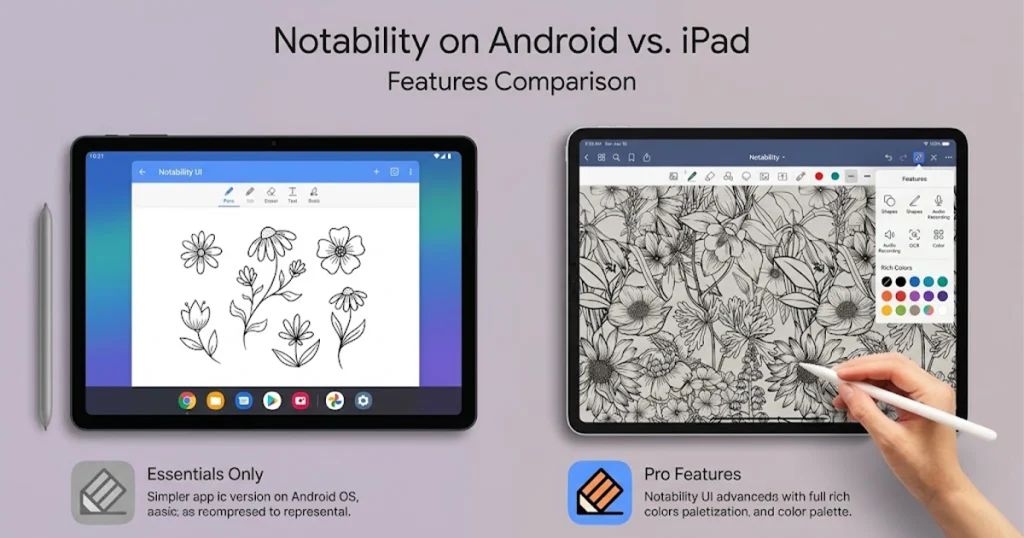
Notability for Android has finally given Android tablet users access to one of the best-known digital note-taking apps previously associated mainly with Apple’s ecosystem. After arriving on Android, the app is now available through Google Play and supports handwritten notes, PDF annotation, audio recording, AI-powered study tools, Notability Cloud and stylus input, including Samsung’s S Pen.
But there is an important question behind the launch: how much of the Notability experience actually comes to Android?
The Android version can already handle serious note-taking and studying, but it is not identical to the iPad experience. Some features are still unavailable, and the way syncing and backups work is important to understand before moving your existing notes or paying for a subscription.
After looking at the current Android features, platform differences, subscription options and user feedback, here is what you need to know about Notability for Android.
What Is Notability for Android?
Notability for Android is the Android version of Notability’s digital note-taking app. It is available through the Google Play Store and requires a free Notability account. Users can create a new account directly from Android or sign in with an existing account.
The app is designed primarily around digital notebooks and study workflows. You can write with a stylus, type notes, annotate PDFs, record audio, organize notes into folders and use AI-powered tools depending on your subscription.
For Samsung Galaxy Tab owners, one of the most important additions is S Pen support. Notability says users can write and draw with a stylus, including the S Pen, although some stylus-specific behavior is still being refined.
The app is currently distributed through Google Play rather than the Galaxy Store.
What Can You Actually Do With Notability for Android?
The current Notability for Android release is much more than a basic digital notebook. Its main tools are aimed at students, professionals and anyone who wants handwritten and typed information together.
Handwritten Notes and S Pen Support
Handwriting is one of the main reasons people use Notability, and the Android version supports stylus input.
Samsung Galaxy Tab users can use the S Pen for writing and drawing, making the app particularly relevant for people who prefer writing notes by hand rather than typing everything on a keyboard.
The Android app also includes tools for handwriting, drawing, highlighting, erasing and other note-editing tasks.
Notability has also expanded handwriting recognition on Android. Its Google Play listing says handwriting recognition now supports 72 languages, including Arabic, Hindi and Hebrew.
That could be particularly useful for students and multilingual users who want handwritten notes to become searchable or converted into text.
PDF Annotation
Notability for Android can also be used as a PDF annotation tool.
You can bring documents into your notes and write over them, highlight important information and organize study material alongside your handwritten notes.
This makes the app useful for university students who receive lecture slides, textbooks, worksheets or research papers as PDF files.
Instead of moving between a PDF reader and a separate notes app, you can keep much of the workflow inside one workspace.
Audio Recording
Audio recording is another major part of the Notability experience.
Students can record lectures, while professionals can use the feature for meetings or interviews. Notability also offers transcription and AI features on supported subscription plans.
This is where the app becomes more than a traditional handwriting application. A note can contain written information alongside recorded audio, giving users another way to review what happened during a class or meeting.
AI and Study Tools
The latest versions of Notability for Android also include AI-focused tools.
Depending on the subscription, users can work with features such as note summaries, questions and flashcards, transcription, Smart Notes and Chat with Your Notes.
Notability’s recent updates have also added features such as asking questions across notes and using lecture or meeting recordings with AI-assisted note enhancement.
For students, this could turn a collection of handwritten notes into a more interactive study system rather than simply a digital replacement for paper.
Notability for Android vs iPad: What Is Different?
This is where the Android version becomes more complicated.
Notability for Android is not currently a feature-for-feature copy of the iPad version. The company itself says some features are not yet available on Android and that notes may not look completely identical when moving between platforms.
Here is a simplified comparison:
| Feature | Android | iPad/iOS |
|---|---|---|
| Handwritten notes | Yes | Yes |
| S Pen support | Yes | Not applicable |
| PDF annotation | Yes | Yes |
| Audio recording | Yes | Yes |
| Notability Cloud | Yes | Yes |
| Cross-platform syncing | Yes | Yes |
| AI study tools | Yes, depending on plan | Yes, depending on plan |
| Native Comments | Not currently available | Available on supported versions |
| Text-Only Mode | Not currently available | Available |
| Third-party backup | Different limitations on Android | Available depending on setup |
| Apple Pencil features | Not applicable | Yes |
The difference is important if you have used Notability on an iPad for years and expect the Android version to behave exactly the same.
The company is continuing to develop the Android application, so the list of differences can change over time.
What Features Are Missing From Notability for Android?
One of the biggest questions surrounding Notability for Android is not what the app can do, but what it still cannot do.
Notability’s current Android FAQ confirms that some features are not yet available. These include native Comments and Text-Only Mode, while the company says it is working to bring additional features to Android.
Community discussions also mention other differences and feature requests, including the ruler, certain navigation tools, templates and other customization options. These are user reports and feature requests rather than a complete official list of limitations.
That distinction matters.
A feature being requested by an Android user does not necessarily mean the feature is completely absent from every version of Notability. The safest approach is to check the current Android documentation before assuming that a specific tool is supported.
For someone coming from iPad, these smaller differences can matter more than the headline Android launch.
How Good Is Notability on a Samsung Galaxy Tab?
For Samsung users, Notability for Android is arguably more interesting than the launch alone suggests.
Galaxy Tab devices already have large displays and S Pen support, which are a natural fit for handwritten digital notes.
A student can use a Galaxy Tab to:
- Write lecture notes with the S Pen
- Annotate PDFs
- Record lectures
- Organize notebooks
- Search handwritten material
- Use AI study tools
- Review notes later on another supported device
The Google Play version also includes recent performance and stability improvements. The September 4 update mentioned faster opening and typing in long notes, crash fixes and additional protection for edits that have not yet synced.
However, the Android experience is still evolving.
Some early and recent community feedback has mentioned issues involving handwriting behavior, interface controls, crashes and missing functionality. Other users report that initial crashes were fixed quickly and that they are happy to finally have Notability across Android, iPad and Mac.
That mixed feedback is worth keeping in mind. A community complaint can identify a real experience for one device or version, but it should not automatically be treated as a universal problem.
How Does Notability for Android Sync With iPad?
Syncing is one of the most important parts of the Android release.
Notability for Android uses Notability Cloud for cross-platform synchronization. The same Notability account can be used across Android, iOS, Mac and Web, allowing notes and folders to stay synchronized.
There is one important detail for existing iPad users.
Notability Cloud is different from the older iCloud-based syncing system. If your existing notes are still using iCloud sync, Notability says you need to move to Notability Cloud before those notes can sync with Android.
Once the appropriate cloud setup is completed, notes created on Android can sync back to other supported devices.
Notability also says the Android app works offline. You can edit notes without an internet connection, with synchronization taking place once you are connected again.
Does Notability for Android Support Third-Party Backups?
This is an area where Android users need to pay attention.
Notability’s Android FAQ says automatic third-party backup to services such as Google Drive or Dropbox is not available on Android in the same way. Android users instead rely on Notability Cloud for synchronization and can manually export notes when they want another copy.
That means users who have a specific backup workflow should not assume that moving from iPad to Android will preserve every part of that workflow.
Notability’s broader Cloud documentation now says third-party backup can still be used in supported setups, so the exact backup options depend on the platform and configuration being used.
For important school, research or work notes, it is sensible to understand your backup options before moving an entire library.
Does Your Notability Subscription Work on Android?
For existing users, this is one of the easiest questions to answer.
Notability says an existing subscription can be used across devices when you sign into the same Notability account. A separate Android subscription is not required simply because you are adding an Android device.
However, the subscription system itself has several tiers, including Starter, Lite, Plus and Pro. The available features increase with the plan.
For example, higher plans can provide access to AI features, transcription, handwriting and math conversion, additional study tools and other advanced functionality.
One important point is that subscriptions are connected to the Notability account used for the purchase. They cannot simply be transferred from one account to another.
Is Notability Free on Android?
Yes. Notability for Android can be downloaded and used for free, although the free experience has limits and paid subscriptions unlock additional functionality.
The Google Play listing currently says the Starter tier allows unlimited notes and includes features such as Notability Cloud syncing, audio recording and editing tools. Paid plans add additional capabilities such as AI tools, handwriting recognition, math conversion, transcription and other advanced features.
The Android app’s limits and plan structure have also been changing during the rollout. For example, Notability announced an increase to the Starter note limit for Android users in its September update.
That means anyone considering the app should check the current pricing and plan details rather than relying on older launch information.
Notability for Android vs Goodnotes
For Android tablet owners, another obvious comparison is Goodnotes.
Both apps target digital handwriting, PDF annotation and productivity, and both are now relevant to people who want a note-taking system that is not limited to Apple’s hardware.
The important differences are less about declaring one app universally better and more about what each user actually needs.
| Category | Notability | Goodnotes |
|---|---|---|
| Android | Yes | Yes |
| iPad | Yes | Yes |
| Handwriting | Yes | Yes |
| PDF annotation | Yes | Yes |
| Audio recording | Yes | Check current plan/platform support |
| AI features | Yes | Yes |
| Cross-platform use | Yes | Yes |
| Samsung tablet use | Yes | Yes |
| Study-focused features | Strong focus | Strong focus |
For someone already using Notability on an iPad, the Android release has an obvious advantage: the same Notability account and Cloud system can extend the workflow to Android.
For someone starting from scratch, the decision is more dependent on handwriting preferences, pricing, device compatibility, backup requirements and the specific features they actually use.
What Are People Saying About Notability for Android?
The community response is mixed but useful.
Some Android users are excited that they can finally use Notability on Galaxy tablets and other Android hardware. One recent Google Play reviewer said the Android launch removed the main reason they had continued using an iPad, while Notability’s response highlighted cross-platform syncing.
Other users are more focused on what is still missing.
Recent Reddit discussions have asked about missing Android features, subscription requirements and whether specific tools are available before users commit to paying. Users have also requested improvements to handwriting, templates, navigation and other parts of the Android experience.
There are also reports of crashes and syncing problems from individual users. These reports should be taken seriously when evaluating reliability, but they represent individual experiences rather than a measurement of the entire Android user base.
Notability has continued responding to Android feedback and publishing updates, including stability improvements and feature additions during September.
Who Should Use Notability for Android?
Notability for Android makes the most sense for several types of users.
Samsung Galaxy Tab users
If you already own a Galaxy Tab with an S Pen, the combination of a large display and stylus support makes the app suitable for handwritten digital notes.
Students
Students can combine handwritten notes, PDFs, recordings, transcription and study tools in one application.
Existing Notability users
If you already use Notability on an iPad or Mac and also own an Android tablet, cross-platform Cloud syncing can make the Android version particularly useful.
People who annotate PDFs
If much of your work involves textbooks, lecture slides, documents or research papers, Notability provides a workflow built around writing directly on those files.
Users interested in AI-assisted studying
People who want summaries, questions, flashcards, transcription and other AI-assisted features can find those tools within Notability’s higher subscription tiers.
Who Should Think Twice Before Switching?
There are also situations where Notability for Android may not fit your workflow.
If you depend heavily on a particular iPad-only feature, check whether it is supported on Android first.
The same applies to users who rely on a specific backup system. Android’s backup and Cloud setup has important differences from older iCloud-based workflows.
And if you only need a simple app for short text notes, Notability’s larger collection of handwriting, PDF, audio and AI features may be more than you need.
Is Notability for Android Worth It?
The answer depends heavily on how you plan to use it.
For a Samsung Galaxy Tab user who wants handwritten notes, PDF annotation, audio recording and access to Notability’s broader ecosystem, the Android release provides a much more complete option than users had before the launch.
For an existing iPad user who occasionally works on Android, Notability Cloud can make the platform difference much less important.
But users who expect every iPad feature to be present should check the current Android limitations before switching completely. Features such as native Comments and Text-Only Mode are still documented as unavailable on Android, while other differences are continuing to be addressed.
The subscription also deserves attention. Some of the most interesting AI and productivity tools are tied to paid plans, so the free version should not be treated as a complete representation of everything Notability offers.
Final Verdict
Notability for Android is no longer just an app people have been waiting for. It is now a genuine cross-platform note-taking option with handwriting, S Pen support, PDF annotation, audio recording, Cloud syncing and AI-powered study tools.
The biggest limitation is that Android is not completely identical to iPad.
Some features remain unavailable, the backup experience can differ, and users may notice small differences when moving notes between platforms. At the same time, Notability is actively updating the Android application and responding to user feedback.
For Samsung Galaxy Tab users and existing Notability customers, the Android release is particularly significant because it finally makes the app useful across a much wider range of devices.
Before subscribing, however, check the current plan, confirm the features you actually need and make sure the Notability Cloud and backup setup fits your workflow.

Add your first comment to this post