
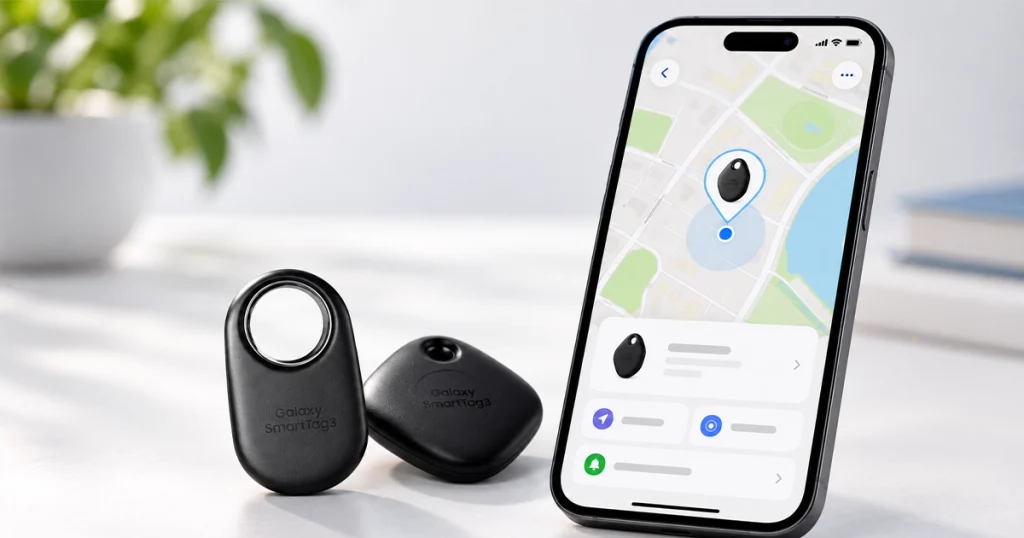
The Samsung Galaxy SmartTag 3 is official, and the biggest change is one Samsung users have been waiting for: iPhone support.
Samsung announced the third-generation tracker on September 30, 2026. The new model is smaller and lighter, offers longer-range directional finding, adds new movement and location alerts, and promises up to 550 days of battery life in normal use or up to 790 days in Power Saving Mode.
More importantly, Samsung is opening core SmartTag features to supported iOS devices for the first time.
There is an important limitation, though: SmartTag 3 does not become an Apple Find My tracker simply because it works with an iPhone. It continues to rely on Samsung’s Galaxy Find Network, and several advanced features remain unavailable on iOS.
Samsung explains the cross-platform change and the new hardware in its official Galaxy SmartTag3 announcement. Samsung Galaxy SmartTag3 official announcement
Does Samsung Galaxy SmartTag 3 Work With iPhones?
Yes. Samsung Galaxy SmartTag 3 works with supported iOS devices, making it the first SmartTag generation to offer cross-platform support for Galaxy and iPhone users.
Through SmartThings Find, Samsung says supported users can check a tag’s location, share access to it and use Search Nearby.
That could make SmartTag 3 particularly useful in mixed-device households.
For example, one person might use a Samsung Galaxy phone while another family member uses an iPhone. If the SmartTag is attached to shared luggage, both can access supported tracking functionality rather than requiring the iPhone user to borrow the Galaxy phone.
Samsung’s announcement confirms the new iOS functionality. Samsung U.S. SmartTag3 announcement
Does SmartTag 3 Work With Every iPhone?
Samsung has not provided a SmartTag3-specific list of every compatible iPhone model in its announcement.
Instead, Samsung directs users to its broader SmartThings compatibility information and notes that feature availability varies by platform.
Samsung’s current SmartThings information says the app is available for iOS, but supported operating-system requirements can change with app updates and can vary by market. Before buying SmartTag 3 specifically for an older iPhone, it is sensible to check the latest SmartThings requirements for your region.
Samsung provides current SmartThings information on its official SmartThings pages. Samsung SmartThings app information
Samsung also provides a dedicated guide for installing SmartThings on an iPhone. Samsung SmartThings on iPhone guide
The Biggest Catch: It Doesn’t Join Apple’s Find My Network
This is the most important distinction for iPhone users.
SmartTag 3 supporting iOS does not mean it joins Apple’s Find My network.
Samsung’s tracker continues to use the Galaxy Find Network when it moves outside the direct connection range of the owner’s device.
Samsung says more than 900 million participating Galaxy devices worldwide can act as finding nodes for Galaxy SmartTag 3. Whether a lost tag gets an updated location can therefore depend on nearby participating Galaxy devices, device settings, network conditions and the region.
Samsung documents how SmartThings Find works with lost Galaxy devices and offline finding in its support material. Samsung SmartThings Find support guide
Samsung also has a separate explanation of SmartThings Find and supported device tracking. Samsung explanation of SmartThings Find
AirTag works differently. Apple’s AirTag uses Apple’s Find My network, which Apple describes as the network behind AirTag’s remote item-finding capability. Apple’s official AirTag announcement and Find My information
Independent reporting from 9to5Google also highlights that SmartTag 3’s new iPhone support does not make it part of Apple’s Find My network or Google’s broader Find Hub network. 9to5Google report on SmartTag 3 network compatibility
Which SmartTag 3 Features Don’t Work on iPhone?
The iPhone experience is not identical to the Galaxy experience.
Samsung specifically says these SmartTag 3 features are unavailable on iOS:
- Compass View
- Ring Phone
- Left Behind Alert
Core location checking, sharing and supported nearby-search functions are available across supported platforms, but Galaxy phones retain access to capabilities that iPhone users do not get.
This is why describing SmartTag 3 as simply “fully compatible with iPhone” would be misleading.
The more accurate description is:
SmartTag 3 supports important finding and sharing functions on iPhone, but some advanced features remain Galaxy-only.
Samsung lists these iOS restrictions in the footnotes of its official announcement. Samsung’s official SmartTag3 compatibility details
Android Authority’s coverage also discusses the difference between the Galaxy and iPhone experiences. Android Authority SmartTag 3 report
SmartTag 3 Extends Directional Finding to Up to 60 Meters
Samsung has also substantially changed how supported Galaxy phones can locate SmartTag 3 nearby.
The tracker uses Bluetooth 6.0 Channel Sounding, allowing Compass View to provide directional and distance guidance from up to 60 meters, or roughly 197 feet, under Samsung’s specified line-of-sight testing conditions.
Samsung says that is around three times farther than the previous generation.
As the phone gets closer to the tag, Ultra-Wideband technology can provide more precise directional information on supported Galaxy devices.
The 60-meter figure should not be interpreted as a guaranteed real-world range. Samsung specifically says the measurement assumes line-of-sight conditions with no obstacles. Walls, nearby electronic devices and other physical barriers can reduce both range and positioning accuracy.
The Bluetooth SIG explains that Bluetooth Channel Sounding was introduced as a standards-based technology for secure and more accurate distance measurement between Bluetooth devices. Bluetooth SIG’s Bluetooth 6.0 Channel Sounding overview
Not Every Galaxy Phone Gets the New 60-Meter Compass View
There is another compatibility limitation worth knowing before buying.
Samsung says Bluetooth Channel Sounding for SmartTag 3 is currently supported on:
Galaxy Z Fold8 Ultra, Galaxy Z Fold8, Galaxy S26 Ultra and Galaxy S26 Plus.
Samsung says additional devices could be supported later.
Compass View can also work with compatible Galaxy devices using UWB, but the exact finding experience depends on the phone’s hardware.
This matters because someone could buy a SmartTag 3 after seeing the “up to 60 meters” claim without realizing that their current phone may not support the technology responsible for that range.
Samsung provides those device restrictions directly in the announcement’s compatibility notes. Samsung SmartTag3 technical compatibility notes
Battery Life Increases to Up to 790 Days
Samsung rates the Galaxy SmartTag 3 battery for:
Normal use: up to 550 days
Power Saving Mode: up to 790 days
The tracker uses a replaceable CR2032 coin-cell battery.
These are Samsung’s laboratory estimates rather than guaranteed battery-life figures. The company says actual results can vary with usage, environmental conditions and the replacement battery used.
Power Saving Mode also comes with limitations. Samsung says features including Compass View and some ringtone or volume options become unavailable, while basic Bluetooth LE finding remains available.
For comparison, Samsung rated the previous Galaxy SmartTag2 for up to 500 days in Normal Mode and 700 days in Power Saving Mode. Samsung’s official Galaxy SmartTag2 announcement
Samsung also discussed the SmartTag2 battery design in an interview with the product’s development team. Samsung SmartTag2 developer interview
SmartTag 3 Is 35% Smaller and 33% Lighter
Samsung has also redesigned the physical tracker.
According to the company, Galaxy SmartTag 3 is approximately:
35% smaller by volume and 33% lighter than its predecessor.
The device now uses a smaller rounded body with an aluminum-decorated button.
One design change is particularly noticeable: the large built-in attachment loop used on SmartTag2 is gone. Samsung instead offers accessories such as a Silicone Case with a keyring and a Loop Case.
That makes the tracker itself smaller, but users who want to attach it directly to keys, luggage or another object may need an accessory depending on how they intend to use it.
The Verge’s coverage provides another look at the redesigned form factor and attachment change. The Verge’s Galaxy SmartTag 3 report
GSMArena also covers the smaller design and new iOS support. GSMArena’s SmartTag 3 coverage
New Place Notification Can Alert You When an Item Leaves an Area
SmartTag 3 introduces Place Notification, a new feature that lets users define an area and receive an alert when a tracked item enters or leaves it.
For example, Samsung says it could be used to alert someone when a bicycle moves away from its usual parking area.
Samsung also presents pet tracking as a potential use case, although users should pay attention to the company’s physical-safety warning when attaching the device to a pet collar.
There is an important detail here: Samsung currently labels Place Notification as a trial feature.
Samsung says it can be enabled through:
SmartThings > Life > Find > Notify when in set place
The company also warns that the displayed SmartTag location can differ from its actual location depending on the surroundings.
Movement Detection Alert Can Tell You When the Tag Starts Moving
Another new feature is Movement Detection Alert.
It is intended to notify the owner when SmartTag 3 movement is detected after the tracker has disconnected from their device.
However, this is not an always-on cellular tracking system.
Samsung says the feature relies on signals detected by nearby Galaxy devices participating in Offline Finding. If there are no suitable Galaxy devices nearby—or environmental conditions interfere with detection—the notification can be delayed or may not arrive at all.
That limitation is important for anyone considering SmartTag 3 for a bicycle, bag or other item where immediate movement alerts are important.
Location History Keeps Up to Seven Days of Data
SmartTag 3 can also show Location History.
Samsung says location history is stored for up to seven days, after which older records are automatically deleted.
This could be useful when the owner wants to see where an item was recently detected instead of viewing only its latest known position.
NFC Lost Mode Returns
SmartTag 3 retains Samsung’s NFC-powered Lost Mode.
An owner can register contact information or a short message in SmartThings. If someone later finds the tag, they can scan it using a compatible NFC-enabled device to view the registered information.
The finder’s phone must support NFC reading and be connected to the internet.
Samsung advises users to turn Lost Mode off once it is no longer needed to help protect their personal information.
Samsung’s older SmartTag support documentation also explains how Galaxy trackers work with SmartThings. Samsung Galaxy SmartTag support documentation
SmartTag 3 Keeps IP67 Water and Dust Resistance
Galaxy SmartTag 3 carries an IP67 water- and dust-resistance rating.
Samsung specifies resistance in up to 1 meter of water for up to 30 minutes under its test conditions.
That doesn’t mean the tracker is intended for continuous underwater use. Samsung specifically says it is not advised for beach or pool use, and water and dust resistance can decrease over time.
The SmartTag Button Can Still Control SmartThings Devices
SmartTag 3 isn’t limited to finding lost objects.
Its physical button can trigger preset SmartThings routines for compatible connected devices.
That means the tracker can also act as a small SmartThings shortcut button—for example, to trigger a supported routine configured in the user’s smart-home setup.
Samsung’s SmartThings site explains the wider SmartThings ecosystem and device controls. Official Samsung SmartThings website
Samsung Galaxy SmartTag 3 Price
In the United States, Samsung has confirmed the following pricing:
One Galaxy SmartTag 3: $29.99
Four-pack: $99.99
The tracker will be offered in Black and White.
Samsung’s U.S. newsroom confirms both prices. Official Samsung U.S. SmartTag3 pricing announcement
For context, Apple’s current-generation AirTag costs $29 for one or $99 for a four-pack in the U.S., according to Apple. Apple’s current AirTag pricing announcement
When Does Samsung Galaxy SmartTag 3 Come Out?
Samsung announced SmartTag 3 on September 30, 2026 through its global and U.S. newsrooms.
The tracker goes on sale in South Korea on October 7, 2026.
Samsung Korea has set the local price at 44,000 won for one tracker. A four-pack containing two white and two black trackers is priced at 149,600 won as part of the announced Korean pricing. Samsung Korea SmartTag3 launch announcement
Samsung says SmartTag 3 will be available in the United States by early November 2026.
Additional markets are expected to follow during 2027, but Samsung has not yet published specific dates and prices for every country.
That means availability and local pricing should be checked again when this article is updated.
Samsung Galaxy SmartTag 3 vs AirTag: What’s the Key Difference?
The most important difference for an iPhone user is still the network.
Galaxy SmartTag 3: Galaxy Find Network
Apple AirTag: Apple Find My network
SmartTag 3 can now provide supported tracking features to iPhone users through Samsung’s ecosystem, but nearby iPhones do not suddenly turn the tracker into an AirTag or make it part of Apple’s Find My network.
AirTag is integrated directly into Apple’s Find My app and network.
Apple also supports sharing an AirTag or another compatible Find My item with other users. Apple’s official AirTag sharing guide
Apple separately provides Share Item Location functionality for temporarily sharing the location of lost items. Apple Share Item Location guide
For SmartTag 3, Samsung’s network remains built around participating Galaxy devices.
Google also operates Find Hub for Android devices, but SmartTag 3 is not being announced as a Google Find Hub tracker. Google’s official site explains how Find Hub works for Android devices. Google Find Hub official site
Google also documents location sharing through Find Hub separately. Google Find Hub help documentation
Who Will Benefit Most From iPhone Support?
The new iPhone support is arguably most useful for mixed Galaxy-and-iPhone households.
Consider a family where one person uses a Galaxy S26 and another uses an iPhone. A SmartTag attached to shared luggage can now be more useful to both people because supported location and sharing functions aren’t restricted entirely to the Galaxy user.
It can also help someone who mainly uses Galaxy hardware but occasionally needs to share access to a tracked item with an iPhone-owning friend or family member.
For someone who lives entirely inside Apple’s ecosystem, however, SmartTag 3’s iPhone support should not be confused with native Find My integration.
PhoneArena’s early coverage similarly highlights both the new iPhone support and the remaining ecosystem differences. PhoneArena SmartTag 3 report
What’s Actually New in Samsung Galaxy SmartTag 3?
The changes that matter most are straightforward.
SmartTag 3 now supports core finding and sharing functions on supported iOS devices. It is approximately 35% smaller and 33% lighter than its predecessor. Samsung rates its battery for up to 550 days normally and 790 days in Power Saving Mode.
Supported Galaxy hardware can use Bluetooth 6.0 Channel Sounding for Compass View from up to 60 meters under ideal line-of-sight conditions.
Samsung has also added Place Notification, Movement Detection Alert and seven-day Location History while retaining features such as NFC Lost Mode, IP67 resistance and SmartThings routine control.
Those are meaningful upgrades, but Samsung’s compatibility restrictions matter just as much as the headline specifications.
The new iPhone support does not mean full feature parity with Galaxy phones, and it does not move SmartTag 3 onto Apple’s Find My network.
That is the key detail iPhone owners should understand before deciding whether Samsung’s new tracker fits their devices.


Add your first comment to this post